iPhone + Android · Private by design
Track the treatment.
Trust the photos.
Norwood is a private photo journal for hair-loss progress: guided capture by scalp region, honest side-by-side comparisons, and reminders for the routine you set. Everything stays on your phone - nowhere else.


Free · No account · Photos stay on your phone · Our privacy promise
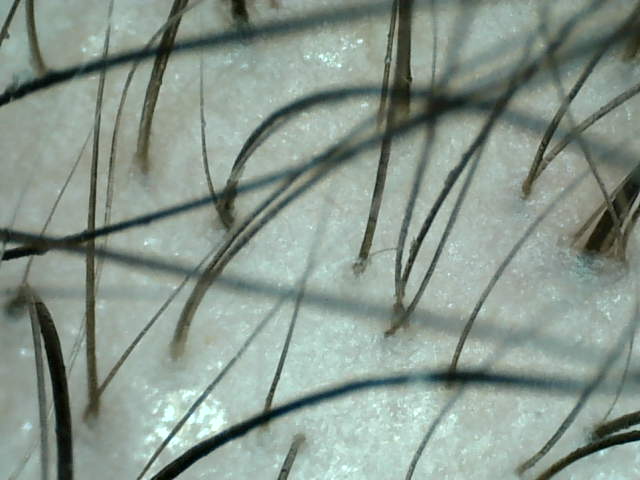
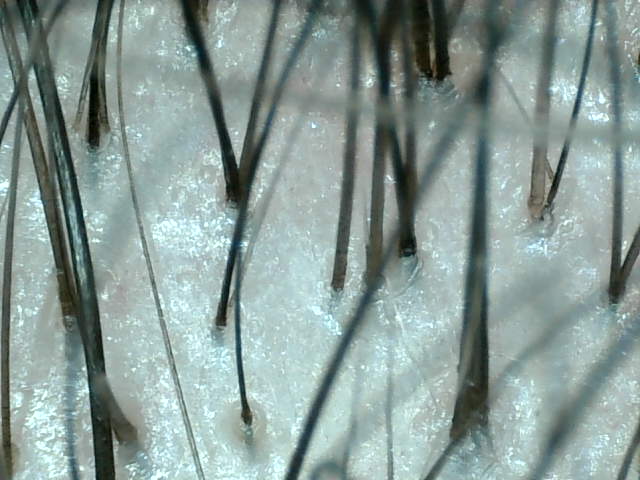
Two scalp microscope captures of roughly the same spot: the left pane is the before photo from January 2026, the right pane is the after photo from August 2026. Moving the divider reveals more of one photo or the other.
Compare
Before and after, aligned - not remembered.
Mirrors lie and memory is worse. Norwood puts any two of your own photos under a slider or side by side, matched by region and tagged by date, with your treatment timeline underneath - so what you see is what actually happened.
Drag the divider - it works right here.Face the camera, tilt chin slightly down
Capture
Six regions. The same shot every time.
A living scalp map guides every photo: hairline, temples, mid-scalp, crown, and back and sides. Each region carries its own framing hint - which camera, which angle, which tilt - so the photo you take today lines up with the one from three months ago.
Tap a region on the map - the hint updates, just like in the app.Routine
Reminders for the schedule you set.
Log the treatments you and your clinician chose, get local reminders at the times you pick, and watch consistency build - a daily ring, streaks, and an adherence calendar, all computed on your phone. Appointments get their own alerts so photo day and follow-ups never slip.
Notifications are local - no push servers involved.Privacy
Your photos never leave your phone.
Progress photos of your scalp are nobody's business but yours. Norwood has no servers, no accounts, and no analytics - your photos and health data cannot leave your phone, because there is nowhere for them to go. The free app shows ads, and beyond ads and the one-time Remove Ads check it fetches nothing from the internet - both run blind, with no access to your photos, your logs, or anything about your scalp. No subscriptions, and no AI score judging you: Norwood documents, it doesn't judge.
- Accounts
- None
- Cloud
- None
- Analytics SDKs
- Zero
- Photo storage
- On-device only
- Ads (free app)
- Blind to your data
- Photos & health data
- Never leave the phone
No account required
Open the app and start. There is nothing to sign up for, no email to hand over, and no password to forget.
Biometric app lock
An optional lock handled entirely by the OS - Face ID on iPhone, fingerprint on Android. The app never sees or stores biometric data.
Backups you control
Export every photo and log as a single zip, delivered to the share sheet. You pick where it goes - or whether it goes anywhere at all.
How it works
Three habits. One honest record.
01 · Capture
Photograph a region
Under a minute with guided framing - front or rear camera, or import from your library. Photos are tagged by region and date.
02 · Compare
Study the difference
Pick any two dates for a region and look honestly - slider or side by side, with your treatment timeline for context.
03 · Stay consistent
Keep the routine
Reminders keep your schedule on track, and every dose you log builds the record your next photo will be compared against.
Questions
Fair questions, straight answers.
Is my data ever uploaded anywhere?
Never - not your photos, not your treatment logs, not your settings. There is no Norwood server to upload to; everything you record lives in the app's storage on your phone. Beyond the free version's ads and the small Remove Ads purchase check, the app fetches nothing from the internet - and neither ads nor the purchase check can see your photos or health information. The optional wireless scalp microscope streams video into your phone over its own local WiFi; nothing flows out.
How much does it cost?
Norwood is free, supported by ads: a banner on the home screen and an occasional full-screen ad after finishing tasks like exporting share images - never during capture, comparison, or in your photo library. There are no subscriptions, and a one-time Remove Ads purchase in Settings removes them permanently. The optional wireless scalp microscope is third-party hardware you can add later; the app never requires it.
Which devices does it support?
iPhone (iOS 16.4 or later) and Android (7.0 or later). The full treatment-tracking experience - adherence, streaks, the daily ring - is currently iPhone-first; on Android, Norwood offers the photo journal, comparisons, and general reminders. Both versions also support an optional wireless scalp microscope: magnified close-ups with follicle-level detail a phone camera can't resolve, so subtle month-over-month change is easier to see (how the scalp microscope method works). No microscope is required - the phone camera covers everything else.
Can Norwood tell me if I'm losing hair?
No, and it doesn't try. Norwood has no AI score and gives no verdicts - lighting and photo conditions make automated judgments unreliable. What Norwood gives you is evidence: aligned photos taken months apart that show what memory can't.
How do I take hair loss progress photos I can actually compare?
Same lighting, same angle, same distance - every time. That is the whole trick, and it is what Norwood automates: the scalp map frames each of the six regions with its own camera and angle hint, so this month's photo matches last month's. Even lighting and a consistent hairstyle help too.
How often should I take progress photos?
Monthly is enough for most people. Hair change is slow, so a consistent monthly photo of each region beats daily snapshots taken at different angles in different light. Norwood's recency dots show which regions are due, and photo day takes a few minutes.
Can I show these photos to my dermatologist?
Yes - that is one of the best uses. Dated, region-labeled, consistently framed photos are exactly what clinicians ask for when assessing change over time. Bring your phone to the appointment, or export a backup zip; nothing needs to be uploaded anywhere.
Can I track a treatment routine, like minoxidil?
Yes. Log any routine you and your clinician chose - a topical such as minoxidil, microneedling, supplements - and Norwood reminds you at the times you set and shows your adherence next to your photo timeline. Norwood documents your routine; it does not diagnose, treat, or promise results.
Why is the app called Norwood?
It is named after the Norwood scale, the seven-stage scale doctors use to describe male-pattern hair loss. The app does not assign you a stage - no scoring, no verdicts. It gives you consistent, dated photos so you and, if you choose, your doctor can judge for yourselves.
What happens if I lose or change my phone?
Export a backup first: Settings > Export backup produces a single zip with every photo, thumbnail, and log, handed to the system share sheet. Save it wherever you trust, then restore it on the new phone. Norwood never does this for you in the background - a backup only exists if you make one.
Does Norwood diagnose or treat hair loss?
No. Norwood is a journal, not a doctor. It does not diagnose, treat, cure, or prevent anything, and it does not give medical advice. It keeps an honest photographic record and reminds you of the schedule you chose. For medical advice, see a qualified professional - and bring your photos.
Why should I trust the privacy claims?
Because the claim is narrow and checkable: your photos and health data never leave your device. There are no accounts and no Norwood servers - the app has nowhere to send your data and we could not read it if it did. The app ships no analytics or crash-reporting SDKs. The free version's ads - plus the small purchase check behind Remove Ads - are the only things that talk to the internet: Google's ad SDK fetches ads and reports which were shown, but ad requests are built with no access to your photos, logs, or anything about your scalp - and in regions with consent laws, no ad is requested until you agree. The same goes for this website: no cookies, no advertising, no cross-site tracking - the only measurement is cookieless, aggregate page counts that cannot identify you. Details in the privacy policy.
Keep the record.
Keep it yours.
Free, private, and ready when your next photo day comes around.